What Responder actually does
When a Windows client fails to resolve a hostname through DNS, it does not give up. It falls back to multicasting the query across the local subnet and trusts whoever answers first. Three legacy protocols carry that fallback. Link-Local Multicast Name Resolution (LLMNR) on UDP 5355, NetBIOS Name Service (NBT-NS) on UDP 137, and multicast DNS (mDNS) on UDP 5353.
Responder listens for those broadcasts and answers them, claiming to be whatever host the victim was looking for. The victim then tries to authenticate to Responder, which is running rogue SMB, HTTP, LDAP and FTP servers to catch the authentication attempt and record the challenge-response. The tool has been public since 2012 and ships in Kali, so treat it as a baseline capability of anyone who reaches your internal network, not an advanced threat.
The captured NetNTLMv2 hash goes one of two ways. Offline to Hashcat, where a weak service-account or user password falls in hours. Or, more dangerously, straight back onto the wire in a relay attack, where the attacker forwards the authentication to a real server before the handshake completes and lands an authenticated session as the victim. No password ever gets cracked in a relay. The attacker borrows the authentication mid-flight.
That distinction drives everything below. Killing the poisoning protocols stops the easy hash capture. It does nothing about relay, because an attacker with a foothold can coerce authentication through other channels and relay it anyway.
Kill the poisoning fallback first
This is the highest-impact, lowest-risk change on the list, and in an environment with working DNS it breaks nothing. Domain-joined hosts resolve everything they need through DNS. The multicast fallback exists for peer-to-peer name resolution that a managed AD network does not rely on.
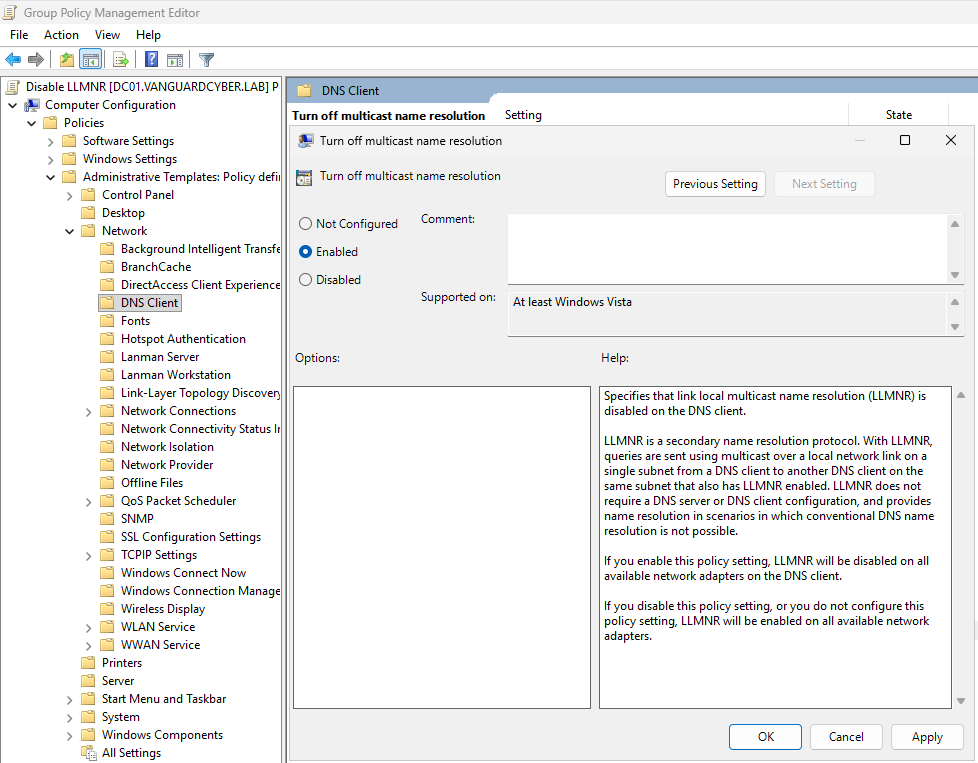
LLMNR has a dedicated Group Policy setting. Under Computer Configuration, Administrative Templates, Network, DNS Client, enable "Turn off multicast name resolution". That single policy disables the LLMNR fallback across every machine the GPO applies to.
NBT-NS is the one people forget, and disabling LLMNR alone leaves half the attack surface open because Responder poisons NBT-NS the same way. There is no Administrative Templates policy for it on current builds. The cleanest domain-wide method is DHCP option 001 (Microsoft Disable NetBIOS over TCP/IP) set to disable NetBIOS. For hosts that miss DHCP scope, push a startup script through GPO that sets NetbiosOptions to 2 on each interface under HKLM\SYSTEM\CurrentControlSet\Services\NetBT\Parameters\Interfaces. Value 2 disables NetBIOS over TCP/IP, 0 defers to the DHCP setting, and 1 enables it.
mDNS is the third channel and the one most guides skip. Responder poisons it too. It has no Group Policy toggle, so it is disabled through the DNS Client service configuration or host firewall rules blocking UDP 5353. Test this one on its own, because mDNS backs device discovery for AirPrint, Bonjour and some printers. If you have Macs or AirPrint in the environment, confirm those still work before you enforce it everywhere.
Verify the change on a test host with netstat. No listener on UDP 5355, 137 or 5353 means the fallback is gone. Then run Responder from a second machine and confirm the poisoned query fails with a clean DNS error instead of a captured hash. A config you have not tested with the actual tool is a config you are guessing about.
One dependency to check before you roll this domain-wide. If the environment uses Web Proxy Auto-Discovery (WPAD) and relies on multicast to find the wpad host, disabling these protocols will break proxy auto-config for those clients. The right fix is to disable WPAD and remove the wpad DNS entry, because WPAD poisoning is its own relay vector, but flush that out in a pilot group first.
Break relay with SMB signing and channel binding
Poisoning is now dead for the easy path. Relay is not, so this is the half that actually protects a modern, DNS-clean network.
SMB signing is the primary control. When signing is required, the client and server add a keyed hash to each message, so an attacker relaying a session cannot tamper with it or inject their own without invalidating the signature. Microsoft's own documentation frames signing as protection against relay and spoofing, and this is the control that turns a captured session into a dead end.
The good news is that the default finally changed. On Windows 11 24H2 the SMB client requires signing by default, and Windows Server 2025 enforces it on outbound connections, where previously signing was enforced by default only for the SYSVOL and NETLOGON shares and for domain controller clients. If your fleet has moved to those builds, a large slice of SMB relay closed itself. Most Australian environments have not fully moved, so on anything older you still enforce signing yourself.
Set "Microsoft network client: Digitally sign communications (always)" and the matching server policy under Computer Configuration, Windows Settings, Security Settings, Local Policies, Security Options. Before you enforce, audit. Windows 11 24H2 and Server 2025 emit new events when a peer connects without signing (client event 31998 in the SMBClient Audit log, server event 3021 in the SMBServer Audit log), which lets you find non-supporting devices before you break them. Older Windows has no such logging, so on legacy hosts you fall back to network captures to find the stragglers, usually third-party appliances and some NAS boxes.
SMB is not the only relay target. LDAP relay hits domain controllers, and the defence is LDAP signing plus LDAP channel binding, which ties the authentication to the specific TLS channel so a relayed bind fails. This is also the current ACSC-endorsed line. In the joint Detecting and Mitigating Active Directory Compromises guide led by the ASD's ACSC, the advice on NTLM is to disable it where possible, and where it cannot be disabled, to enable LDAP channel binding, extended protection for authentication, and SMB signing. That is the exact stack described here.
Close the AD CS relay path
If you run Active Directory Certificate Services, there is a specific relay chain worth calling out because it skips straight to domain compromise. An attacker coerces a domain controller into authenticating (the PetitPotam technique uses the MS-EFSRPC protocol to trigger it) and relays that DC authentication to an AD CS web enrolment endpoint, which by default accepts NTLM. The result is a certificate issued for the DC, which the attacker then uses to authenticate as the domain controller.
Microsoft documents this in KB5005413. The mitigations are to enable Extended Protection for Authentication on the AD CS web enrolment and certificate enrolment web service endpoints, disable NTLM on those endpoints, and question whether you need the web enrolment role services running at all. If nothing legitimately uses them, removing the role removes the target.
This one matters disproportionately. The other controls limit what a relayed session can reach, whereas an unprotected AD CS endpoint turns a single coerced authentication into a domain-wide key. If you have AD CS, treat this as a priority, not a footnote.
NTLM is going away, but not fast
Every control above is a mitigation for a protocol Microsoft has already deprecated. NTLM was formally deprecated in mid-2024 and is on a phased path to being disabled by default. Phase 1 auditing tooling is available now on Windows Server 2025 and Windows 11 24H2. The nearest hard date is October 2026, when Microsoft plans to flip the BlockNTLMv1SSO default from audit to enforce, disabling NTLMv1 single sign-on unless you have deliberately configured otherwise. Microsoft calls that date tentative. Disabling network NTLM by default is tied to a future Windows Server release with no fixed date yet.
The practical read for a defender is this. Deprecated does not mean gone. NTLM stays in the operating system as a fallback you can re-enable, and NTLMv2, the version used in relay attacks, remains permitted for the foreseeable future. So the auditing tooling is the useful part today. Turn on NTLM auditing now, build an inventory of what still uses it, and start moving those dependencies to Kerberos so that when the default flips you are ahead of it rather than firefighting a breakage. Fixing this now is cheaper than the forced migration later.
This is already Essential Eight and ACSC baseline
None of this is exotic. It maps directly onto obligations Australian organisations already report against. Restricting NTLM and enforcing signing sits under the hardening and restrict-administrative-privileges intent of the Essential Eight, and the specific control stack is exactly what the ASD's ACSC recommends in its Active Directory compromise guidance. If you are a SOCI-regulated entity or you assert an Essential Eight maturity level, a network where Responder captures a domain hash on day one is a finding waiting to be written up. A clean penetration test report and a poisoning-vulnerable network cannot both be true.
For anyone reporting to a board or an auditor, the framing is simple. These are low-cost configuration changes, mostly Group Policy, that close the single most reliable internal attack path we see. The cost is testing effort, not licensing.
What to do next
Ranked by impact against effort.
- Disable LLMNR, NBT-NS and mDNS by GPO, piloted first. Highest impact, lowest risk in a DNS-healthy network. Test with Responder from a second host to confirm, and watch for WPAD and printer dependencies.
- Audit then enforce SMB signing. Use the 24H2 and Server 2025 signing events to find non-supporting devices before enforcing. On older builds, use network captures. If your fleet is already on the new builds, confirm the default is intact rather than assuming it.
- Enable LDAP signing and channel binding on domain controllers. Closes the LDAP relay path the SMB controls do not cover.
- If you run AD CS, fix the enrolment endpoints per KB5005413. Extended Protection on, NTLM off, and remove web enrolment roles you do not use. Domain-compromise blast radius makes this a priority.
- Turn on NTLM auditing today and build the dependency inventory. You will need it before the default disables in a future release, and October 2026 already tightens NTLMv1.
If you would like us to validate any of this the way an attacker would, an internal assessment is the fastest way to find the hosts still answering multicast and the shares still accepting unsigned SMB.